

How to Customize Compliance Templates for Audits
Last Updated: October 23, 2026
Quick Summary
Customize compliance templates for audits by identifying your audit scope, mapping requirements to your organization's processes, building checklists with specific questions tied to evidence, developing testing procedures with examples, and creating audit reports that document findings clearly. Customized templates transform generic documentation into working tools that reflect your actual operations and reduce audit time.
- Start by defining audit scope including systems, departments, locations, time period, and applicable standards before customizing any templates.
- Map each compliance requirement to your specific processes, responsible parties, and existing evidence to prevent documenting controls that don't exist.
- Build checklist questions specific to your organization with columns for evidence sources, sample sizes, and acceptable criteria.
- Test templates with a pilot audit before full rollout and update them whenever your processes change.
- Document assumptions and decisions behind customization so auditors understand your reasoning and next year's team understands the context.
Table of Contents
- Why Customizing Compliance Templates Matters
- Step 1: Identify Your Audit Scope and Objectives
- Step 2: Map Compliance Requirements and Standards to Your Organization
- Step 3: Build Your Compliance Audit Checklist Template
- Step 4: Develop Audit Checklist Examples and Control Testing Procedures
- Step 5: Create Your Compliance Audit Report Template
- Compliance Template Customization Best Practices
- Compliance Template Customization Best Practices
- Frequently Asked Questions
Why Customizing Compliance Templates Matters
Generic compliance templates don't work. They're built for nobody in particular, which means they fit everybody poorly. Your organization has unique processes, regulatory requirements, and risk profiles.
Customizing compliance templates for audits transforms them from theoretical documents into working tools. They become audit-ready because they reflect your actual operations.
The teams that passed most efficiently weren't the ones with the most detailed templates, they were the ones who customized templates to their actual control environment first.
This guide walks you through how to customize compliance templates step by step: identify your scope, map requirements, build checklists, develop testing procedures, and create credible audit reports.
Step 1: Identify Your Audit Scope and Objectives
Start by defining exactly what you're auditing. Scope is the boundary. It answers: What systems, processes, and locations fall under this audit?
Scope determines everything downstream.
Write your scope in specific terms:
- Systems covered: Which applications, databases, and infrastructure are in scope? Name them. "All IT systems" is too vague. "Salesforce, Active Directory, AWS cloud infrastructure, and on-premises file servers" is clear.
- Departments or functions: Which teams and processes? "Finance," "HR," "Customer Support," or "All departments"?
- Geographic locations: Which offices, data centers, or regions?
- Time period: Are you auditing a calendar year, fiscal year, or rolling 12 months?
- Standards and regulations: Which frameworks apply? ISO 27001? SOC 2? HIPAA? GDPR? Be explicit.
Next, define your audit objectives, the questions you're trying to answer. They guide what you test and what evidence you collect.
Common audit objectives include:
- Verify that access controls prevent unauthorized users from accessing systems
- Confirm that change management procedures are followed before deploying code
- Ensure that data backups are performed, tested, and recoverable
- Validate that security incidents are detected and reported within required timeframes
- Confirm that employee training on compliance is current and documented
Write objectives as measurable statements. "Ensure security is good" is not an objective.
Getting Audit Ready for SOC 2: A Step-by-Step Guide provides a detailed framework for defining scope and objectives specific to SOC 2 audits. The same principles apply across frameworks.
Document your scope and objectives in a single page, share it with your audit team and stakeholders, and confirm alignment before moving forward.
Define these key elements when establishing your audit scope and objectives.
| Element | Purpose | Example |
|---|---|---|
| Systems covered | Identify applications and infrastructure in scope | Salesforce, Active Directory, AWS infrastructure |
| Departments or functions | Specify which teams and processes to audit | Finance, HR, Customer Support |
| Geographic locations | Define offices, data centers, or regions | All offices, specific data centers |
| Time period | Set the audit timeframe | Calendar year, fiscal year, rolling 12 months |
| Standards and regulations | List applicable frameworks | ISO 27001, SOC 2, HIPAA, GDPR |
Step 2: Map Compliance Requirements and Standards to Your Organization
This step is where generic templates become specific to your business. You're translating abstract requirements into concrete controls your organization must implement.
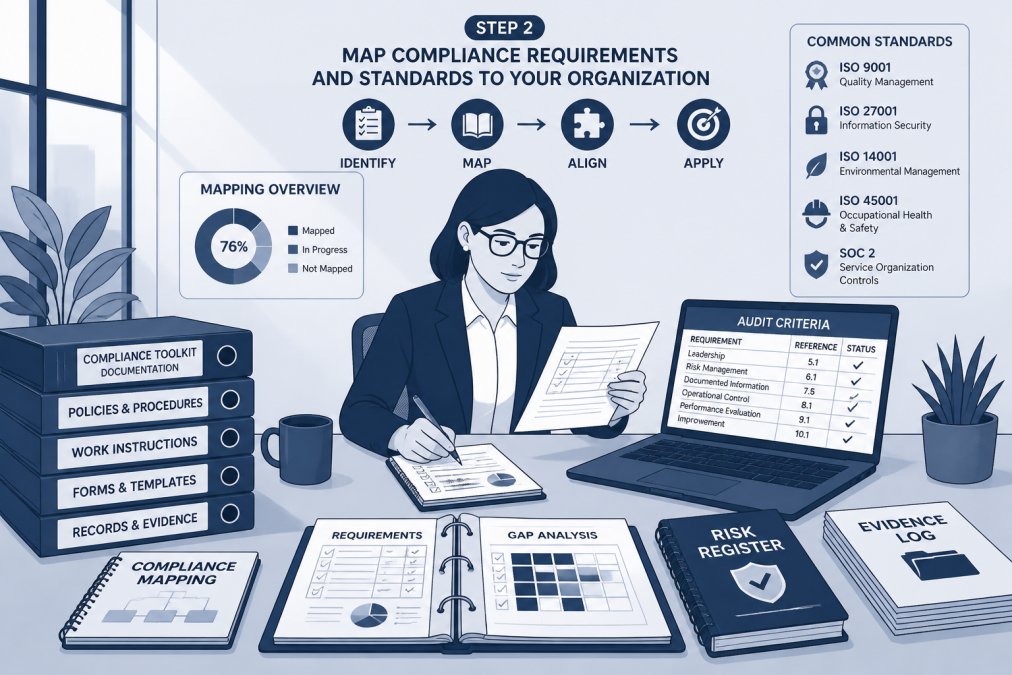
Take your audit scope and the standards you identified. Extract the specific requirements from each standard. For ISO 27001, that means reading Annex A controls.
Create a mapping table. List each requirement. Then, for each requirement, document:
- Which process or system addresses this requirement? (e.g., "Active Directory manages user access")
- Who is responsible? (e.g., "IT Security Manager")
- How do we currently do this? (e.g., "We provision access through a ticketing system and review it quarterly")
- What evidence exists? (e.g., "Access provisioning requests, quarterly access reviews, termination checklists")
This mapping prevents two critical mistakes. First, it stops you from documenting controls that don't exist. Second, it stops you from missing controls you already have but haven't formalized.
Many teams skip this step and jump straight to templates. That's backwards. You're trying to fit your organization into a template.
Start with high-risk areas. If you're preparing for ISO 27001, focus on access control, encryption, and incident management first. These are areas auditors examine closely.
Document your mapping in a spreadsheet. It becomes your audit roadmap. Share it with your auditor early.
Step 3: Build Your Compliance Audit Checklist Template
Your audit checklist is the tool your audit team uses to collect evidence and document findings. A strong checklist asks specific questions tied to your requirements, telling the auditor exactly what to look for and how to verify it.
Start with your requirements mapping from Step 2. For each requirement, draft checklist questions. Questions should be:
- Specific to your organization: Not "Does the organization have access controls?" but "Are Active Directory access reviews performed quarterly and documented?"
- Testable: The auditor should be able to answer yes or no based on evidence
- Tied to evidence: Each question should link to documents or records that prove compliance
Here's a framework for building questions:
- Policy existence: Does a documented policy exist? (e.g., "Is there a documented access control policy?")
- Implementation: Is the policy implemented in practice? (e.g., "Are access requests reviewed and approved before provisioning?")
- Evidence: Is implementation documented? (e.g., "Are access provisioning requests and approvals retained?")
- Monitoring: Is compliance monitored? (e.g., "Are access reviews performed at least quarterly?")
Use the Internal Audit Toolkit to access pre-built audit checklist templates that help you customize compliance templates for your organization. These templates provide the structure and question formats that auditors expect.

For each checklist question, add columns for:
- Evidence source: Where will the auditor find proof? (e.g., "Active Directory logs," "Access review spreadsheet," "Training records")
- Sample size: How many items will the auditor examine? (e.g., "Review 10 random access requests from the past quarter")
- Acceptable criteria: What constitutes a pass? (e.g., "100% of access requests have documented approval before provisioning")
A well-built checklist reduces audit time: auditors know what to look for, your team knows what evidence to prepare, and testing stays consistent across audit cycles.
Step 4: Develop Audit Checklist Examples and Control Testing Procedures
Now you move from planning to execution. Control testing procedures tell your audit team how to actually test each control. Examples show what passing evidence looks like.
For each checklist question, document the testing procedure. Include:
- What you're testing: The specific control (e.g., "User access provisioning process")
- How you'll test it: The step-by-step procedure (e.g., "Select 10 random users added in the past quarter. Retrieve their access requests. Verify that each request has documented business justification, manager approval, and IT approval before access was granted")
- Sample size and method: How many items will you examine and how will you select them? (e.g., "Random sample of 10 from population of 150 new users in audit period")
- Success criteria: What passes the test? (e.g., "100% of sampled requests have all three approvals documented before access date")
- Documentation: How will you record results? (e.g., "Completed testing form with screenshots of request approvals")
Provide examples of passing evidence: a sample access request with all required approvals, a completed access review spreadsheet, a training completion record.
Include failing examples too, an access request without manager approval, a user with access to systems they shouldn't have, a missed quarterly review.
Document common pitfalls. "Many teams provision access before approval is documented. Verify that approval date is before access grant date." "Some managers approve requests verbally.
Create a testing procedures document your team uses during the audit.
Step 5: Create Your Compliance Audit Report Template
Your audit report is the final deliverable. It documents findings, identifies gaps, and recommends corrective actions. A strong report is clear, specific, and actionable.
Your report template should include these sections:
Executive Summary
- Overall audit result: Pass, pass with findings, or fail
- Number and severity of findings
- Key areas of strength
- Key areas needing improvement
Audit Scope and Objectives
- What was audited and why
- Time period covered
- Standards or regulations assessed
Findings
- Each finding should include:
- Control being tested
- What should happen (requirement)
- What actually happened (observation)
- Why it matters (risk)
- Evidence supporting the finding
Corrective Actions
- For each finding, document:
- Root cause
- Corrective action (what will change)
- Responsible party
- Target completion date
- How you'll verify the fix
Follow-up and Closure
- Schedule for verifying corrective actions
- Process for closing findings once fixed
Use the Free Compliance Templates & Toolkits (Download Now) to access audit report templates. These templates provide the structure auditors expect. Customize sections to match your organization's terminology and processes.
Keep your report specific. Instead of "Access controls need improvement," write: "User access reviews are not performed quarterly as required by our access control policy.
Specific findings are easier to fix. Your team understands exactly what's wrong. Auditors see that you take findings seriously. Follow-up audits show measurable improvement.
Compliance Template Customization Best Practices
Customization done poorly creates more problems than it solves. These practices make it effective.
Version control your templates. When you update a template, document why and when, assign a version number, and include the date and author.
Customize for your risk profile. Not all controls matter equally. Focus customization on high-risk areas.
Involve the people doing the work. Your IT team knows how access provisioning actually works.
Document assumptions and decisions. Record why you customized a section and what business decision drove it.
Update templates when processes change. Processes evolve. When you implement a new system, change a procedure, or reorganize teams, update your templates.
The How to Maintain Continuous Compliance: A Practical Guide covers the next step after customizing templates: keeping your compliance program current as your organization grows and changes.
Compliance Template Customization Best Practices
Building customized templates is work. The payoff is audits that run smoothly and findings that are rare.
The alternative is scrambling during the audit: questions your templates don't address, evidence that wasn't organized, gaps you didn't know existed. Customization prevents all of that.
Start with your audit scope. Know exactly what you're auditing and why. Map your requirements to your organization. Build checklists that reflect your actual processes.
Customizing compliance templates for audits transforms generic documentation into tools your organization can actually use. The effort upfront saves weeks during the audit itself.
Compliance Toolkits provides fully editable, audit-ready templates designed by compliance experts and software engineers. Get started with Internal Audit Toolkit and pass your next audit with confidence.
Frequently Asked Questions
How do you customize a compliance audit template?
Start by defining your audit scope and objectives, then map applicable compliance requirements and standards to your organization. Next, adapt the template's checklist questions, control testing procedures, and evidence collection methods to reflect your specific processes, risk areas, and regulatory framework. Document your customizations in version control, and validate the template with a pilot audit before full rollout. This ensures consistency, accountability, and audit readiness.
What should a compliance audit checklist template include?
A complete compliance audit checklist template should include audit objectives tied to specific clauses or requirements, control criteria with measurable standards, detailed checklist questions for each control area, guidance on evidence collection and supporting documentation, fields for audit findings and nonconformities, corrective action tracking, and sign-off sections for the auditor and auditee. It should also reference the applicable compliance requirements and standards, audit scope, and procedures for follow-up and remediation.
Can you use one audit template for multiple compliance frameworks?
Yes, but with careful customization. A generic audit template can serve as a foundation, but you must adapt it for each framework's specific requirements, control objectives, and terminology. Map each framework's clauses to your template sections, add framework-specific checklist questions, and ensure evidence collection methods align with that framework's audit expectations. Version control becomes critical when managing multiple framework versions to avoid confusion and ensure consistency across audits.
How often should compliance templates be reviewed and updated?
Review compliance templates at least annually, or immediately when regulatory requirements, standards, or your organizational processes change significantly. After each internal or external audit, capture lessons learned and update templates to address gaps or nonconformities. When standards are revised (such as ISO updates or NIST guidance changes), reassess your templates and incorporate new requirements. Maintain a change log documenting all updates, effective dates, and the reason for revision to ensure audit trail and version control.
